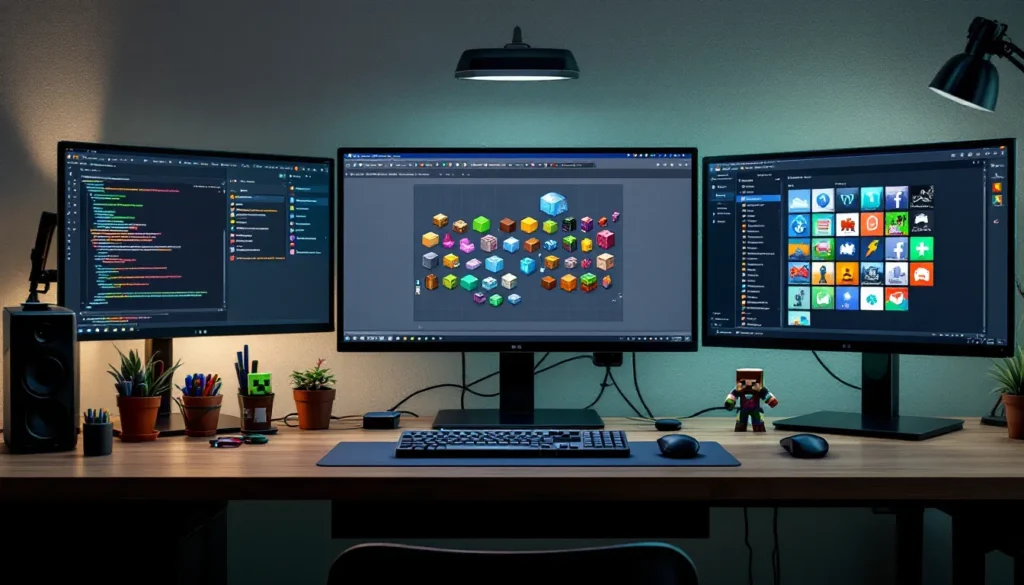

Minecraft clipart has become essential for anyone building a presence in the gaming space, whether you’re a streamer, content creator, or game developer. These pixel-perfect graphics let you add visual flair without firing up Photoshop or commissioning custom art. The beauty of Minecraft clipart lies in its flexibility: it works across platforms, matches the game’s iconic aesthetic, and taps into the massive nostalgia factor that keeps millions engaged. In 2026, the landscape of available assets has exploded, with everything from official Mojang resources to community treasures hidden across the web. This guide covers where to find quality Minecraft clipart, how to use it effectively, and how to create your own without stepping on anyone’s intellectual property.
Key Takeaways
- Minecraft clipart provides instantly recognizable, versatile graphics that work across platforms for streamers, content creators, and developers without requiring professional design skills.
- Free and high-quality Minecraft clipart sources include Minecraft.net, OpenGameArt.org, DeviantArt, and the Minecraft Wiki, each with varying licensing terms for commercial and non-commercial use.
- Non-commercial use of official Minecraft graphics is permitted, but commercial projects require explicit licensing or partnership approval from Mojang Studios to avoid copyright issues.
- Custom Minecraft-style clipart can be created using affordable tools like Aseprite ($20), free options like Piskel, or by extracting and modifying official textures from the game’s files.
- Always credit fan artists and check license requirements (CC0, CC-BY, CC-BY-SA) when using community-created Minecraft clipart to respect copyright and build professional credibility.
- Effective Minecraft clipart implementation spans streaming overlays, social media posts, thumbnails, website headers, and merchandise—leveraging the pixel-art format’s scalability and instant brand recognition.
What Is Minecraft Clipart and Why Gamers Love It
Minecraft clipart refers to any extracted, rendered, or recreated graphic elements from Minecraft, blocks, items, mobs, characters, biomes, and environmental features. Unlike generic gaming graphics, Minecraft clipart carries instant recognition and authenticity that resonates with the game’s 300+ million player base.
Gamers love Minecraft clipart for several reasons. First, it’s instantly recognizable. A dirt block or creeper face needs no explanation, players see it and immediately understand context. Second, it’s versatile. The same assets work on thumbnails, social media posts, merchandise, stream overlays, and website headers. Third, it’s community-embraced. Minecraft’s modding and fan-art culture means there’s minimal gatekeeping around non-commercial use, and the community actively shares quality resources.
The pixel art style is also forgiving. Unlike photorealistic graphics that demand high resolution and perfect lighting, Minecraft’s 16×16 and 32×32 pixel textures look crisp at any scale. Whether you’re creating a small Discord emoji or a full-size poster, the art style maintains its charm and clarity. This accessibility has made Minecraft clipart the de facto standard for gaming content creators who want visual polish without hiring a specialized artist.
Where to Find High-Quality Minecraft Clipart Online
The key to finding usable Minecraft clipart is knowing where to look and understanding licensing restrictions. Not all sources are created equal, and some come with legal baggage.
Free Minecraft Clipart Repositories
The most accessible starting point for free Minecraft clipart is Minecraft.net, Mojang’s official site. They provide official artwork packs, promotional graphics, and texture compilations that are royalty-free for non-commercial projects. The quality is official and unquestionable, though the selection is smaller than community repositories.
Pinterest hosts thousands of Minecraft clipart boards. While quality varies wildly, you can find curated collections by searching terms like “Minecraft item sprites” or “Minecraft block textures.” Just verify source attribution before downloading.
DeviantArt is a goldmine for free community-created Minecraft clipart. Creators often upload spritesets, character renders, and biome assets with permissive licenses. Always check the individual artwork’s license (some require attribution, others allow commercial use).
OpenGameArt.org specializes in royalty-free game assets, including dedicated Minecraft clipart sections. Everything here is explicitly licensed for reuse, making it ideal for developers and creators who need legal clarity.
Reddit communities like r/Minecraft and r/Minecraftbuilds frequently feature high-quality fan art. Post a polite request for specific assets, and the community often delivers or points you toward reliable sources.
Premium and Licensed Minecraft Graphics
If you need commercial rights or exclusive assets, premium sources offer more control. Etsy hosts hundreds of Minecraft clipart sellers offering PNG bundles, SVG files, and customized graphics starting at $5-$25 per pack. Read reviews carefully, quality ranges from professional to amateur.
Creative Fabrica offers subscription-based access to thousands of Minecraft-inspired graphics, including clipart, brushes, and design elements. At around $15-$20 monthly, it’s cost-effective if you’re a regular creator.
Direct licensing through Mojang Studios is possible for larger commercial projects. If your YouTube channel, game, or business wants official Minecraft branding, contact their partnership program. Expect formal agreements and specific usage terms.
Community-Created Collections and Fan Resources
Community wikis are underrated sources. The Minecraft Wiki hosts official texture files and detailed documentation of every asset in the game. You can download texture packs and extract individual sprites from them legally (assuming non-commercial use).
Curseforge and Nexus Mods host thousands of texture and resource packs created by the community. Many include clipart-ready assets, high-resolution revamps of original textures that work perfectly for graphics projects. Just credit the pack creator if you use their work publicly.
Popular Minecraft Clipart Styles and Categories
Not all Minecraft clipart is created equal. Understanding the major categories helps you find exactly what you need for your project.
Block and Item Graphics
Blocks and items are the bread and butter of Minecraft clipart. These include everything from cobblestone and oak wood to diamond pickaxes and enchanted books.
Block clipart works best for:
- Thumbnails and title cards (stacking blocks creates visual interest)
- Game UI and interface design
- Educational or tutorial graphics
- Merchandise and print design
Item graphics are highly detailed and work perfectly for:
- Social media posts (a single rendered item with minimal background)
- Stream overlay elements
- Icon sets for websites or apps
- Loading screens and pause menus
The advantage of block and item clipart is consistency. Mojang maintains strict pixel-perfect standards across all official assets, so mixing and matching feels cohesive.
Character and Mob Sprites
Steve and Alex (the default player characters) are iconic Minecraft clipart. Customized skins, animations, and character renders are endlessly popular for content creators wanting to personalize their branding.
Mob sprites, including creepers, zombies, endermen, and piglins, carry personality and emotion. Creators use mob clipart for:
- Mascots and brand characters
- Reaction images and Discord emotes
- Animated GIF content
- Character-specific overlays for streamers
The pixel-art format of character sprites means they scale beautifully. A 32×32 pixel creeper face becomes a perfect Discord emoji, and the same asset enlarges cleanly to a 500×500 pixel thumbnail graphic.
Biome and Environmental Assets
Biome clipart includes grass, trees, water, sky gradients, and landscape elements. These are less commonly featured as standalone clipart but invaluable for creating thematic graphics.
Common uses:
- Background layers for streaming (jungle leaves, nether fog)
- Website headers and promotional banners
- Seasonal or themed social media graphics
- Game UI and menu backgrounds
Biome assets work best when layered. A forest biome clipart overlay combined with text and icons creates depth and context without needing custom illustration.
How to Use Minecraft Clipart in Your Projects
Finding clipart is one thing: using it effectively is another. Context and execution determine whether a graphic enhances your project or looks lazy.
Incorporating Clipart Into Gaming Content
If you’re writing gaming guides, reviews, or tutorials on your website, Minecraft clipart breaks up text and provides visual anchors. A pickaxe icon signals a tools section, furnace graphics indicate crafting information, and ore blocks highlight resource locations.
For in-depth project documentation or modding guides, extract sprites directly from the game’s texture files and arrange them alongside your text. This approach feels authentic and helps readers follow complex instructions. Tools like Minecraft Characters PNG provide pre-curated character assets ready to drop into projects without the extraction hassle.
Mobile gaming content benefits particularly from clipart. If you’re developing a Minecraft-adjacent game or tool, using official Minecraft-inspired graphics (without infringing on trademarks) maintains brand consistency while tapping into player familiarity.
Using Graphics for Streaming and Video Content
Streamers and video creators rely heavily on Minecraft clipart for visual branding. Common applications include:
- Overlays: Transparent PNG files of items or mobs positioned in stream corners
- Alerts: Creeper or TNT explosions triggered by subscriptions or donations
- Thumbnails: Arranged block stacks, character skins, or item collections
- Transitions: Pixelated fade effects using block patterns
- Channel art: Banners and profile pictures incorporating biome themes
For video editing, motion graphics tools like OBS or Streamlabs accept Minecraft clipart directly. Many creators layer multiple sprites with slight animations (scaling or rotation) to draw viewer attention without overwhelming the stream.
Keyboards shortcuts like OBS’s built-in scene editor make it trivial to position clipart on-screen, adjust opacity, and trigger animations based on events. This is where the scalability of pixel art shines, no quality loss from resizing.
Applying Clipart to Social Media and Marketing
Social media favors bold, scannable graphics. Minecraft clipart excels here because it’s immediately recognizable and works at any resolution. A single diamond block can anchor a post about game updates. A cluster of enchanted books signals a guide or tutorial.
Tiktok and Instagram Reels benefit from animated Minecraft clipart. Creators use sprite animations (mining, crafting, building) as background elements while overlaying text and voiceover. The familiarity of Minecraft visuals keeps viewers engaged.
For Discord communities, Minecraft clipart emoji packs are standard. Creating custom emoji sets using block sprites, item graphics, and character elements strengthens community identity and makes chat more visually engaging.
Marketing materials, newsletters, landing pages, promotional banners, use Minecraft clipart to signal gaming relevance. A crypto project, NFT collection, or gaming-adjacent startup often incorporates subtle Minecraft-inspired graphics to build credibility with their audience.
Creating Your Own Minecraft Clipart: Tools and Techniques
If available clipart doesn’t meet your needs, creating custom Minecraft-style graphics is surprisingly accessible. The pixel-art format means you don’t need professional-grade software or years of experience.
Pixel Art Software and Editors
Aseprite is the gold standard for pixel art creation. At $20 one-time (or free if compiled from source), it includes animation support, layer management, and a color palette system specifically designed for pixel work. Minecraft creators swear by it for custom sprite work.
Piskel (by Google) is free, browser-based, and requires zero installation. Upload existing Minecraft textures, modify them, and export as PNG. It’s limited compared to Aseprite but perfect for quick edits and experimentation.
Pyxel Edit focuses on tileset creation, ideal if you’re making custom block variations or environmental assets. It’s $10-$15 and integrates seamlessly with Minecraft’s texture format.
For complete beginners, MS Paint still works. Yes, really. The Minecraft community’s early clipart was made in Paint, and its simplicity forces discipline. Modern Paint (built into Windows 10+) supports layers and transparency, making it viable for basic sprites.
Freestyle tools like GIMP (free, open-source) handle pixel art if you zoom to 800-1000% and enable pixel-grid snapping. It’s overkill for simple work but powerful if you need extensive post-processing.
Extracting Textures and Assets From The Game
Extracting is the fastest route to custom clipart. Every Minecraft Java Edition installation contains official texture files in .zip format. Navigate to your Minecraft folder, find the version’s jar file, and extract it using any archive tool. Inside, you’ll find individual 16×16 PNG files for every block, item, and entity texture.
For Bedrock Edition (console, mobile, Windows 10+), resource packs are more accessible. Download official packs from the Marketplace, extract them, and modify textures freely for personal projects.
Tools like NBTExplorer and Minecraft Texture Converter automate extraction if you’re uncomfortable with manual jar file handling. They’re free and streamline the process to a few clicks.
Once extracted, open textures in Aseprite or Piskel. Scale them up if needed, apply modifications, and export as PNG. This approach yields authentic clipart because you’re literally using the official source files.
Customizing and Modifying Existing Graphics
Take an existing block or item graphic and remix it. Change colors to create variant sprites, a dirt block becomes grass, stone becomes deepslate. Combine multiple sprites into new designs. Stack a pickaxe with a diamond to create a “mining guide” icon.
Advanced techniques include:
- Recoloring: Shift hue and saturation to create themed variants
- Scaling: Double or triple resolution while maintaining pixelated edges
- Combining: Overlay multiple sprites at different opacity levels
- Animating: Slight rotation or bobbing motion for idle animations
When modifying fan-created or community assets, always credit the original artist, even if you’re just tweaking colors or combining elements. Many Minecraft artists explicitly welcome this kind of derivative work, just respect the original creator’s license.
Copyright, Licensing, and Best Practices for Using Minecraft Clipart
This is where many creators stumble. Minecraft clipart exists in a complex licensing landscape, and using assets without understanding the rules invites takedowns or legal friction.
Understanding Minecraft’s Official Usage Rights
Mojang owns everything. Official Minecraft textures, characters, and game assets are Microsoft/Mojang intellectual property. But, they’ve granted surprisingly permissive non-commercial licenses for fan creators.
Non-commercial use (YouTube videos, Twitch streams, fan art, community projects) is explicitly allowed. You can use official Minecraft clipart in guides, tutorials, and content without explicit permission.
Commercial use is restricted. If you’re selling a game, merchandise, or professional service using official Minecraft graphics, you need explicit licensing or partnership approval. A T-shirt company can’t print Steve faces without a deal. A game developer can’t use official Minecraft assets in a commercial project without negotiation.
The gray area: Some creators monetize YouTube videos or Twitch streams using Minecraft clipart. Technically, this is commercial (you’re earning money), but Mojang has historically tolerated small creators. Scale matters. A 100-subscriber channel using creeper graphics is invisible to enforcement. A major studio doing the same would face immediate takedown.
When in doubt, use the official Minecraft branding guidelines. Mojang publishes clear rules about logo usage, asset distribution, and commercial limitations. If your use case matches their guidelines, you’re safe.
Attribution and Crediting Fan Artists
Community-created clipart often comes with specific license requirements. Always check the source.
Creative Commons licenses (CC0, CC-BY, CC-BY-SA) are common for Minecraft fan art. Understand the difference:
- CC0: No rights reserved. Use freely, no credit required.
- CC-BY: Requires attribution (name the artist) but allows commercial use.
- CC-BY-SA: Requires attribution and forces derivatives to use the same license.
When crediting, include:
- Artist’s name or handle
- Original source (link if possible)
- License type (“Used under CC-BY”)
Missing attribution isn’t just poor etiquette, it’s copyright infringement. Artists spend hours creating assets. Crediting them costs nothing and builds goodwill with the community. Many creators are happy to see their work reused if properly credited.
For high-profile projects (merchandise, professional applications, commercial games), reach out to fan artists directly. Most are thrilled to grant explicit permission and may offer exclusive rights or custom work if you’re willing to pay. Buying licenses supports creators and eliminates legal ambiguity.
When using assets from Nexus Mods or Curseforge, the creator’s preferred attribution method is listed on the download page. Follow it exactly. Some prefer a simple credit, others require links back to their mod or social media.
The golden rule: If someone created it and owns the copyright, respect that. Proper attribution and licensing aren’t obstacles, they’re signs of professionalism that separate hobbyist content from legitimate creative work. Industry sites like PC Gamer set the standard by crediting artists and respecting licenses. You should too.
Conclusion
Minecraft clipart sits at the intersection of accessibility, authenticity, and legal complexity. The easiest path depends on your project’s scope. Need a quick graphic for a personal blog? Download free assets from OpenGameArt or the Minecraft Wiki. Creating commercial content? Purchase licensed packs or negotiate with Mojang. Building custom visuals for a professional project? Learn pixel art basics in Aseprite and modify official textures.
The rules matter. Respecting copyright and crediting artists isn’t bureaucracy, it’s the foundation of a healthy creative community. Minecraft’s thriving ecosystem of mods, fan art, and community tools exists precisely because Mojang permits this culture while protecting their IP.
As of 2026, the Minecraft clipart landscape is healthier than ever. Tools are free or cheap, sources are abundant, and the community actively shares resources. Whether you’re a streamer building brand identity, a developer adding visual polish, or a content creator making tutorials, the assets you need exist somewhere. Finding them, using them responsibly, and creating within that framework elevates your work from amateur to professional.